ミュージックプレイヤーのWebアプリケーションを作ってみる
以前、JavaコンソールアプリケーションとしてMusicPlayerを作成したが、今回は、それをSpringBootを使用したWebアプリケーションとして作成してみる。
まずは新規プロジェクトを作成する。
プロジェクト名は好きなように決めてよい。
pom.xml で SpringBoot のバージョンを変更する。
デフォルトでは2.1.6になっているが、エラーが発生するので、これまでに使っていた2.1.4にする。
そして、ThymeleafとJPAとHSQLDBの依存関係も追加しておく。
<?xml version="1.0" encoding="UTF-8"?>
<project xmlns="http://maven.apache.org/POM/4.0.0" xmlns:xsi="http://www.w3.org/2001/XMLSchema-instance"
	xsi:schemaLocation="http://maven.apache.org/POM/4.0.0 http://maven.apache.org/xsd/maven-4.0.0.xsd">
	<modelVersion>4.0.0</modelVersion>
	<parent>
		<groupId>org.springframework.boot</groupId>
		<artifactId>spring-boot-starter-parent</artifactId>
		<version>2.1.4.RELEASE</version>
		<relativePath/> <!-- lookup parent from repository -->
	</parent>
	<groupId>jp.abc</groupId>
	<artifactId>stunes</artifactId>
	<version>0.0.1-SNAPSHOT</version>
	<name>stunes</name>
	<description>Demo project for Spring Boot</description>

	<properties>
		<java.version>1.8</java.version>
	</properties>

	<dependencies>
		<dependency>
			<groupId>org.springframework.boot</groupId>
			<artifactId>spring-boot-starter-web</artifactId>
		</dependency>

		<dependency>
			<groupId>org.springframework.boot</groupId>
			<artifactId>spring-boot-starter-test</artifactId>
			<scope>test</scope>
		</dependency>

		<dependency>
			<groupId>org.springframework.boot</groupId>
			<artifactId>spring-boot-starter-thymeleaf</artifactId>
		</dependency>

		<dependency>
			<groupId>org.springframework.boot</groupId>
			<artifactId>spring-boot-starter-data-jpa</artifactId>
		</dependency>

		<dependency>
			<groupId>org.hsqldb</groupId>
			<artifactId>hsqldb</artifactId>
		</dependency>
	</dependencies>

	<build>
		<plugins>
			<plugin>
				<groupId>org.springframework.boot</groupId>
				<artifactId>spring-boot-maven-plugin</artifactId>
			</plugin>
		</plugins>
	</build>

</project>
HSQLDBを起動するBATファイルに、新しいデータベースインスタンスを追加する。
cd C:\pleiades\hsqldb-2.4.1\hsqldb\lib
java -cp hsqldb.jar org.hsqldb.Server --database.0 db/mydata --dbname.0 mydata --database.1 db/stunes --dbname.1 stunes
Musicエンティティを作成する。
package jp.abc;

import javax.persistence.Column;
import javax.persistence.Entity;
import javax.persistence.GeneratedValue;
import javax.persistence.GenerationType;
import javax.persistence.Id;
import javax.validation.constraints.NotEmpty;
import javax.validation.constraints.NotNull;

@Entity
public class Music {
	@Id
	@GeneratedValue(strategy = GenerationType.AUTO)
	@Column
	@NotNull
	private long id;

	@Column(length = 200, nullable = false)
	@NotEmpty
	private String title;

	@Column(length = 200, nullable = false)
	@NotEmpty
	private String artist;

	public long getId() {
		return id;
	}

	public void setId(long id) {
		this.id = id;
	}

	public String getTitle() {
		return title;
	}

	public void setTitle(String title) {
		this.title = title;
	}

	public String getArtist() {
		return artist;
	}

	public void setArtist(String artist) {
		this.artist = artist;
	}

	@Override
	public String toString() {
		return "Music [title=" + title + ", artist=" + artist + "]";
	}

}
リポジトリを作成する。
package jp.abc;

import org.springframework.data.jpa.repository.JpaRepository;

public interface MusicRepository extends JpaRepository<Music, Long> {

}
コントローラを作成する。
package jp.abc;

import org.springframework.beans.factory.annotation.Autowired;
import org.springframework.stereotype.Controller;
import org.springframework.web.bind.annotation.RequestMapping;
import org.springframework.web.servlet.ModelAndView;

@Controller
public class MusicController {

	@Autowired
	private MusicRepository repository;

	@RequestMapping("/")
	public ModelAndView index(ModelAndView mav) {
		mav.setViewName("index");
		return mav;
	}
}
HTMLテンプレートを作成する。
CSSと入力フォームの部分は、mydata.html の該当箇所をコピーして使うと早い。
<!DOCTYPE html>
<html xmlns:th="http://www.thymeleaf.org">
<head>
<meta charset="UTF-8">
<title>ミュージックプレイヤー</title>
<style type="text/css">
h1 {
  font-size: 18pt;
  font-weight: bold;
  color: gray;
}
body {
  font-size: 13pt;
  color: gray;
  margin: 5px 25px;
}
pre {
  border: solid 3px #ddd;
  padding: 10px;
}
tr {
  margin: 5px;
}
th {
  padding: 5px;
  color: white;
  background: darkgray;
}
td {
  padding: 5px;
  color: black;
  background: #f0f0f0;
}
.err {
  color: red;
}
</style>
</head>
<body>

<h1>ミュージックプレイヤー</h1>
<p th:text="${msg}"></p>
<form method="post" action="/" th:object="${formModel}">
  <table>
    <tr>
      <td><label for="title">タイトル</label></td>
      <td>
        <input type="text" name="title" th:value="*{title}"
      			th:errorclass="err" />
      	<div th:if="${#fields.hasErrors('title')}" th:errors="*{title}"
      		th:errorclass="err"></div>
      </td>
    </tr>
    <tr>
      <td><label for="artist">アーティスト</label></td>
      <td>
        <input type="text" name="artist" th:value="*{artist}"
      			th:errorclass="err"/>
      	<div th:if="${#fields.hasErrors('artist')}" th:errors="*{artist}"
      		th:errorclass="err"></div>
      </td>
    </tr>
    <tr>
      <td></td>
      <td><input type="submit" /></td>
    </tr>
  </table>
</form>

</body>
</html>
これで実行するとエラーが発生する。
コントローラで formModel を渡していないのが原因なので、コントローラを修正する。
package jp.abc;

import org.springframework.beans.factory.annotation.Autowired;
import org.springframework.stereotype.Controller;
import org.springframework.web.bind.annotation.RequestMapping;
import org.springframework.web.servlet.ModelAndView;

@Controller
public class MusicController {

	@Autowired
	private MusicRepository repository;

	@RequestMapping("/")
	public ModelAndView index(ModelAndView mav) {
		mav.setViewName("index");
		Music m = new Music();
		mav.addObject("formModel", m);
		return mav;
	}
}
POSTメソッドを受け付けるようにするために、コントローラを修正する。
package jp.abc;

import org.springframework.beans.factory.annotation.Autowired;
import org.springframework.stereotype.Controller;
import org.springframework.validation.Errors;
import org.springframework.validation.annotation.Validated;
import org.springframework.web.bind.annotation.ModelAttribute;
import org.springframework.web.bind.annotation.RequestMapping;
import org.springframework.web.bind.annotation.RequestMethod;
import org.springframework.web.servlet.ModelAndView;

@Controller
public class MusicController {

	@Autowired
	private MusicRepository repository;

	@RequestMapping(value = "/", method = RequestMethod.GET)
	public ModelAndView index(ModelAndView mav) {
		mav.setViewName("index");
		Music m = new Music();
		mav.addObject("formModel", m);
		return mav;
	}

	@RequestMapping(value = "/", method = RequestMethod.POST)
	public ModelAndView post(
			@ModelAttribute("formModel") @Validated Music music,
			Errors result,
			ModelAndView mav) {
		if (result.hasErrors()) {
			mav.setViewName("index");
			mav.addObject("msg", "エラーです");
			return mav;
		}
		repository.saveAndFlush(music);
		return new ModelAndView("redirect:/");
	}
}
データベース接続の設定を、application.properties ファイルに記述する。
spring.datasource.url=jdbc:hsqldb:hsql://localhost/stunes
spring.datasource.username=sa
spring.datasource.password=
spring.datasource.driver-class-name=org.hsqldb.jdbc.JDBCDriver
spring.jpa.properties.hibernate.dialect=org.hibernate.dialect.HSQLDialect
spring.jpa.hibernate.ddl-auto=update
HTMLテンプレートに、保存されているデータのリストを表示するテーブルを追加する。
<!DOCTYPE html>
<html xmlns:th="http://www.thymeleaf.org">
<head>
<meta charset="UTF-8">
<title>ミュージックプレイヤー</title>
<style type="text/css">
h1 {
  font-size: 18pt;
  font-weight: bold;
  color: gray;
}
body {
  font-size: 13pt;
  color: gray;
  margin: 5px 25px;
}
pre {
  border: solid 3px #ddd;
  padding: 10px;
}
tr {
  margin: 5px;
}
th {
  padding: 5px;
  color: white;
  background: darkgray;
}
td {
  padding: 5px;
  color: black;
  background: #f0f0f0;
}
.err {
  color: red;
}
</style>
</head>
<body>

<h1>ミュージックプレイヤー</h1>
<p th:text="${msg}"></p>
<form method="post" action="/" th:object="${formModel}">
  <table>
    <tr>
      <td><label for="title">タイトル</label></td>
      <td>
        <input type="text" name="title" th:value="*{title}"
      			th:errorclass="err" />
      	<div th:if="${#fields.hasErrors('title')}" th:errors="*{title}"
      		th:errorclass="err"></div>
      </td>
    </tr>
    <tr>
      <td><label for="artist">アーティスト</label></td>
      <td>
        <input type="text" name="artist" th:value="*{artist}"
      			th:errorclass="err"/>
      	<div th:if="${#fields.hasErrors('artist')}" th:errors="*{artist}"
      		th:errorclass="err"></div>
      </td>
    </tr>
    <tr>
      <td></td>
      <td><input type="submit" /></td>
    </tr>
  </table>
</form>

<hr />
<table>
  <tr>
    <th>ID</th><th>タイトル</th><th>アーティスト</th><th>編集</th><th>削除</th>
  </tr>
  <tr th:each="obj : ${datalist}">
    <td th:text="${obj.id}"></td>
    <td th:text="${obj.title}"></td>
    <td th:text="${obj.artist}"></td>
    <td><a th:href="@{'/edit/' + ${obj.id}}">編集</a></td>
    <td><a th:href="@{'/delete/' + ${obj.id}}">削除</a></td>
  </tr>
</table>

</body>
</html>
コントローラで、datalist の名前で、データをわたす。
	@RequestMapping(value = "/", method = RequestMethod.GET)
	public ModelAndView index(ModelAndView mav) {
		mav.setViewName("index");
		Music m = new Music();
		mav.addObject("formModel", m);
		List<Music> list = repository.findAll();
		mav.addObject("datalist", list);
		return mav;
	}
プレイリストも作ってみる
まずはエンティティを作成する。
package jp.abc;

import javax.persistence.Column;
import javax.persistence.Entity;
import javax.persistence.GeneratedValue;
import javax.persistence.GenerationType;
import javax.persistence.Id;
import javax.validation.constraints.NotEmpty;
import javax.validation.constraints.NotNull;

@Entity
public class PlayList {
	@Id
	@GeneratedValue(strategy = GenerationType.AUTO)
	@Column
	@NotNull
	private long id;

	@Column(length = 200, nullable = false)
	@NotEmpty
	private String name;

	public long getId() {
		return id;
	}

	public void setId(long id) {
		this.id = id;
	}

	public String getName() {
		return name;
	}

	public void setName(String name) {
		this.name = name;
	}


}
HTMLテンプレートを作成する。
<!DOCTYPE html>
<html xmlns:th="http://www.thymeleaf.org">
<head>
<meta charset="UTF-8">
<title>プレイリスト</title>
<style type="text/css">
h1 {
  font-size: 18pt;
  font-weight: bold;
  color: gray;
}
body {
  font-size: 13pt;
  color: gray;
  margin: 5px 25px;
}
pre {
  border: solid 3px #ddd;
  padding: 10px;
}
tr {
  margin: 5px;
}
th {
  padding: 5px;
  color: white;
  background: darkgray;
}
td {
  padding: 5px;
  color: black;
  background: #f0f0f0;
}
.err {
  color: red;
}
</style>
</head>
<body>

<h1>プレイリスト</h1>
<p th:text="${msg}"></p>
<form method="post" action="/" th:object="${formModel}">
  <table>
    <tr>
      <td><label for="name">名前</label></td>
      <td>
        <input type="text" name="name" th:value="*{name}"
      			th:errorclass="err" />
      	<div th:if="${#fields.hasErrors('name')}" th:errors="*{name}"
      		th:errorclass="err"></div>
      </td>
    </tr>
    <tr>
      <td></td>
      <td><input type="submit" /></td>
    </tr>
  </table>
</form>

<hr />
<table>
  <tr>
    <th>ID</th><th>名前</th>
  </tr>
  <tr th:each="obj : ${datalist}">
    <td th:text="${obj.id}"></td>
    <td th:text="${obj.title}"></td>
  </tr>
</table>

</body>
</html>
コントローラを作成する。
package jp.abc;

import org.springframework.stereotype.Controller;
import org.springframework.web.bind.annotation.RequestMapping;
import org.springframework.web.servlet.ModelAndView;

@Controller
public class PlayListController {
	@RequestMapping("/playlist")
	public ModelAndView list(ModelAndView mav) {
		mav.setViewName("playlist");
		PlayList pl = new PlayList();
		mav.addObject("formModel", pl);
		return mav;
	}
}
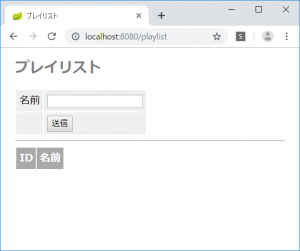
動いた!